

Nobody talks about this enough, but the biggest reason D2C brands lose customers has nothing to do with the product.
It is the support experience. Truly, what happens when something goes wrong after the purchase? The customer reaches out for help!
They message on WhatsApp. Wait for three hours. Send an email. Get a reply that completely ignores the WhatsApp conversation. Or maybe they call the support line.
The customer support agent asks everything again. At that point, the customer is not just frustrated. They leave you!
It is being found that 7 out of 10 customers stop buying from a brand if they get a bad support experience.
Not a series of failures. It is just a single interaction that went wrong.
Most D2C founders look at that stat and think it is a staffing problem. Hire better agents. Train them more. But the agents are usually not the issue. The system they are working in is.
This "Omni-Channel Ticketing System: A Complete Guide for E-commerce Customer Support" is about fixing that system. Specifically, what an omni-channel ticketing system is, why D2C brands need one, and what to actually look for when you are choosing one.
What Is an Omni-Channel Ticketing System?
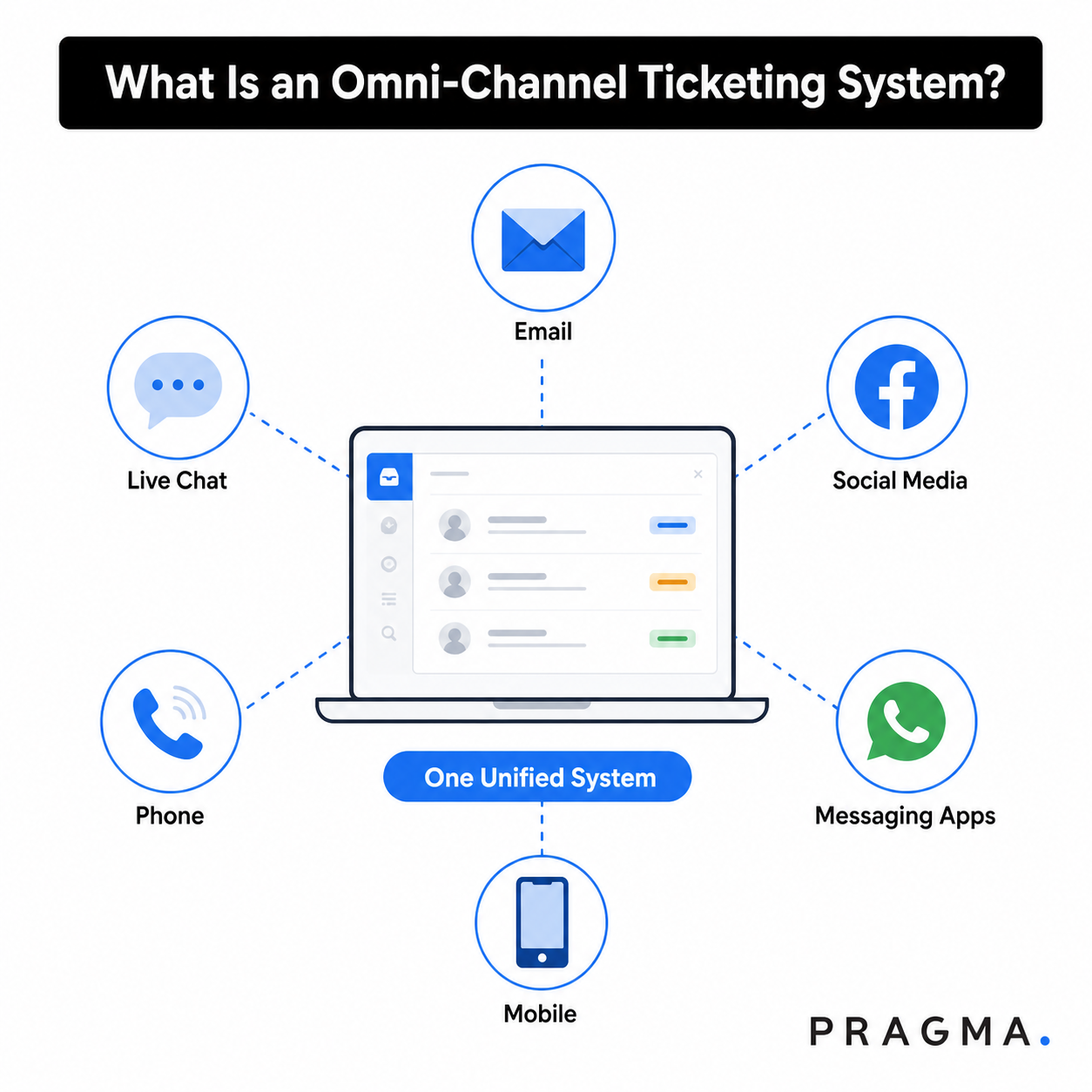
An omni-channel ticketing system is a centralised platform that collects all the requests of customers from every communication channel. It includes WhatsApp, email, Instagram, Facebook, live chat, and SMS.
If we talk in easy words, the concept is straightforward!
Every message your customer sends comes to a single place, regardless of which platform they use. Maybe it's a message on WhatsApp. An Instagram comment or an email. All of it gathers at one platform on one screen for your agents.
Every incoming message becomes a ticket. Every ticket carries that customer's full history with your brand.
It not only adds to the current conversation. It adds everything. Past orders, previous support interactions, return requests, abandoned carts.
Now, here is where confusion is created. Most people mix omnichannel and multi-channel ticketing systems. But they are different!
Multi-channel is a way of being present as a brand on multiple platforms, including WhatsApp, email, and Instagram. And the customers can reach the brand on any platform.
But each of those channels runs completely independently. The person handling WhatsApp has no idea what happened with the email yesterday. The Instagram DMs are managed by someone else entirely, who has never seen the WhatsApp conversation from last week.
Whereas omnichannel is just the opposite of this. It means those channels are actually talking to each other. The customer moves between platforms freely. And the customer support team clearly knows what is going on on different platforms.
A report by Forrester states that companies that are using an omnichannel approach see a 46% increase in customer lifetime value and a 35% increase in retention. This clearly defines how important an omnichannel ticketing system will be to a brand.
Why Do E-commerce Brands Need an Omni-Channel Ticketing System?
To get a clear picture of why e-commerce brands must have an omnichannel ticketing system, have a look at the following points:
Customer Conversations Happen Everywhere
Here is what a real customer journey looks like for a D2C brand.
Customers find a brand on Instagram. Orders through the website. Tracks the shipment on WhatsApp. Something goes wrong, so they raise a return request by email. They followed up on Instagram two days later because nobody got back to them.
So, what is the climax here? There are five touchpoints. Four channels. But only one order.
And still, the customer has to re-explain their situation because the team has no shared view of what happened before.
Most customers will not do that more than once. Instead of that, they will just stop buying from the brand and move to another.
A report found that 62% of online shoppers say that brands could provide them with a good personalised experience if they had better omnichannel strategies.
Your customers already expect this level of connectivity. Most D2C brands are still not delivering it, and the customers notice.
Managing Separate Channels Creates Support Silos
The real cost of disconnected tools does not show up in your software budget. It shows up in your resolution times, your CSAT scores, and eventually your repeat purchase rate. By the time you see it there, you have already lost customers you did not need to lose.
This happens because the agents spend time searching for data instead of solving problems. The same ticket gets picked up by two different people who have no idea about each other.
That is why there is a need to have an omnichannel ticketing system like Pragma Omnichannel CRM that provides better visibility into customer interactions.
Customer Expectations Are Higher Than Ever
Research by HubSpot shows that over 60% of customers want to get a response from the brand within 10 minutes of what they have enquired about. Not within the hour. Only ten minutes. And that expectation applies regardless of which channel they used to reach out.
That is why D2C brands have to compete on experience now as much as on product quality.
A slow or context-free response does not just frustrate customers. It actively pushes them toward a competitor who responds faster.
How Does an Omni-Channel Ticketing System Work?
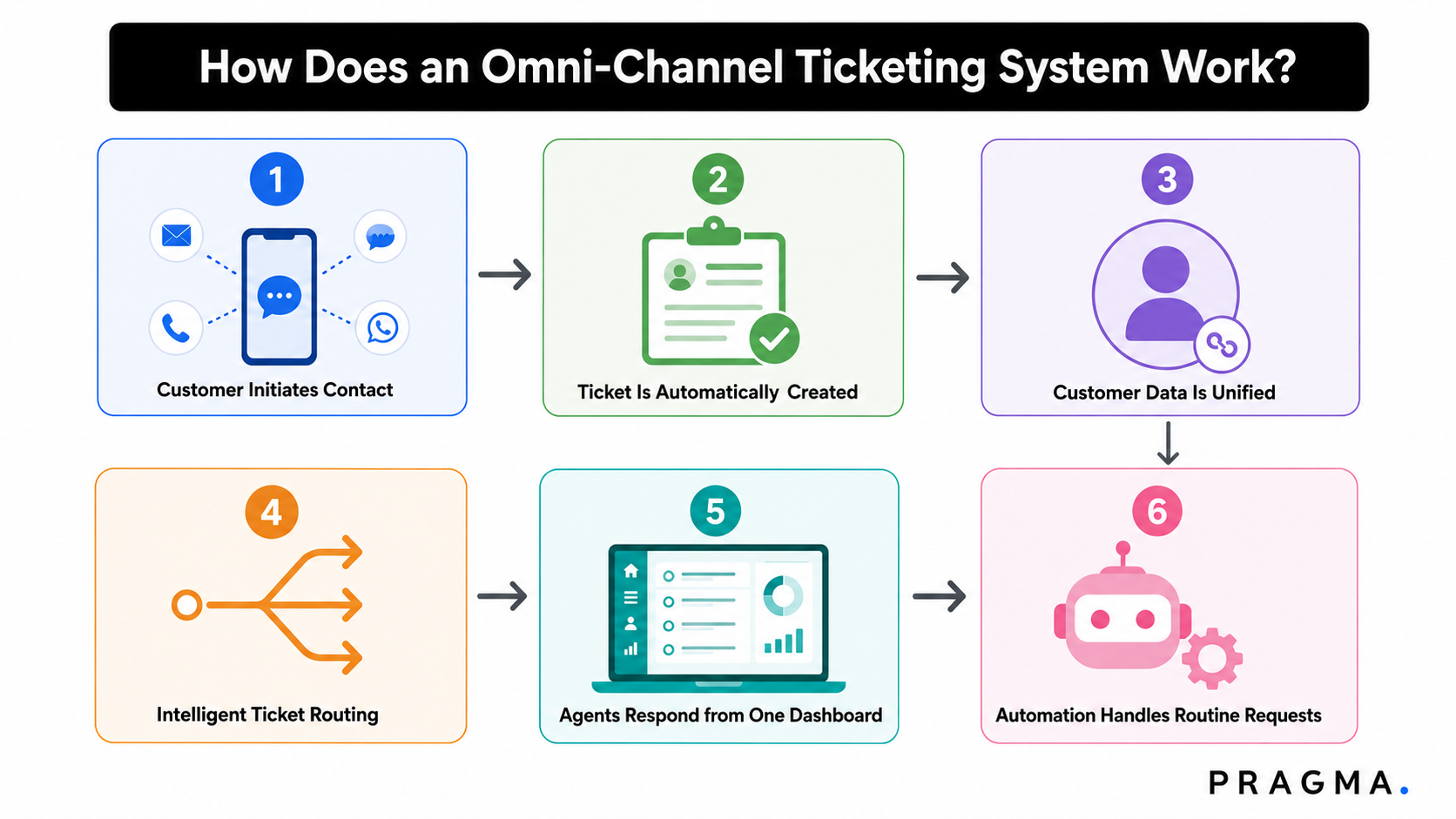
Let us have a look at how this omnichannel ticketing system works and provide a better view to the team:
Step 1: Customer Initiates Contact
Let us say that a customer sends a WhatsApp message about a delayed shipment. Or they comment on your Instagram post about the wrong item.
Even when there are no working hours, the system captures the customer's message; the channel does not matter.
Step 2: Ticket Is Automatically Created
What does the omnichannel platform here do? It converts the incoming message into a support ticket with a unique ID.
It adds the following:
- Customer's contact details
- The channel they used
- Time
- Full message content
So there is no need to enter details manually or whatever the customer's context is. Also, there will be no messages disappearing because someone forgot to check a particular inbox that day.
Step 3: Customer Data Is Unified
This is the part that actually changes how support feels for the customer and for the agent.
The system pulls in the customer's full history automatically. All the previous tickets, past orders, return requests, and earlier conversations across every channel.
And all of this attaches to the new ticket before the agent even opens it.
Pragma Omnichannel CRM does exactly this. When a customer reaches the brand, the customer support agent immediately sees their:
- current order details
- past order details
- complete history
So, there will be no need to ask the customer to repeat their order number or anything else.
Step 4: Intelligent Ticket Routing
The omnichannel system assigns the ticket to the agent who is the right one to solve it. Let's say that a customer makes a query that is related to the billing of a purchase; it will go to the agent who handles it.
A high-value customer gets routed to a senior agent. It means that with the help of an efficient omnichannel ticketing system, no tickets are sitting in a general queue for 45 minutes waiting for someone to notice them.
Step 5: Agents Respond from One Dashboard
With proper Omnichannel CRMs, the agent only opens one screen. They see every ticket from every channel.
They can easily respond to different messages on different platforms, without switching tools or logging into separate platforms.
With Pragma Omnichannel CRM configurable quick replies and keyboard shortcuts, agents can respond to common queries in seconds instead of typing the same answer over and over again.
Step 6: Automation Handles Routine Requests
Order status queries, return initiation, delivery updates, and payment confirmations. These are the queries that eat up most of your team's time.
The good news is that they are also almost entirely automatable, yet most D2C brands are still handling them manually for no good reason.
Pragma's chatbots work across WhatsApp, Messenger, and Instagram for all possible scenarios like Order status, Payment issues, returns, etc. They can handle up to 95% of incoming queries without any agent involvement, with support for 16+ languages and use NLP to follow up with customers intelligently.
Key Components of an Omni-Channel Ticketing System
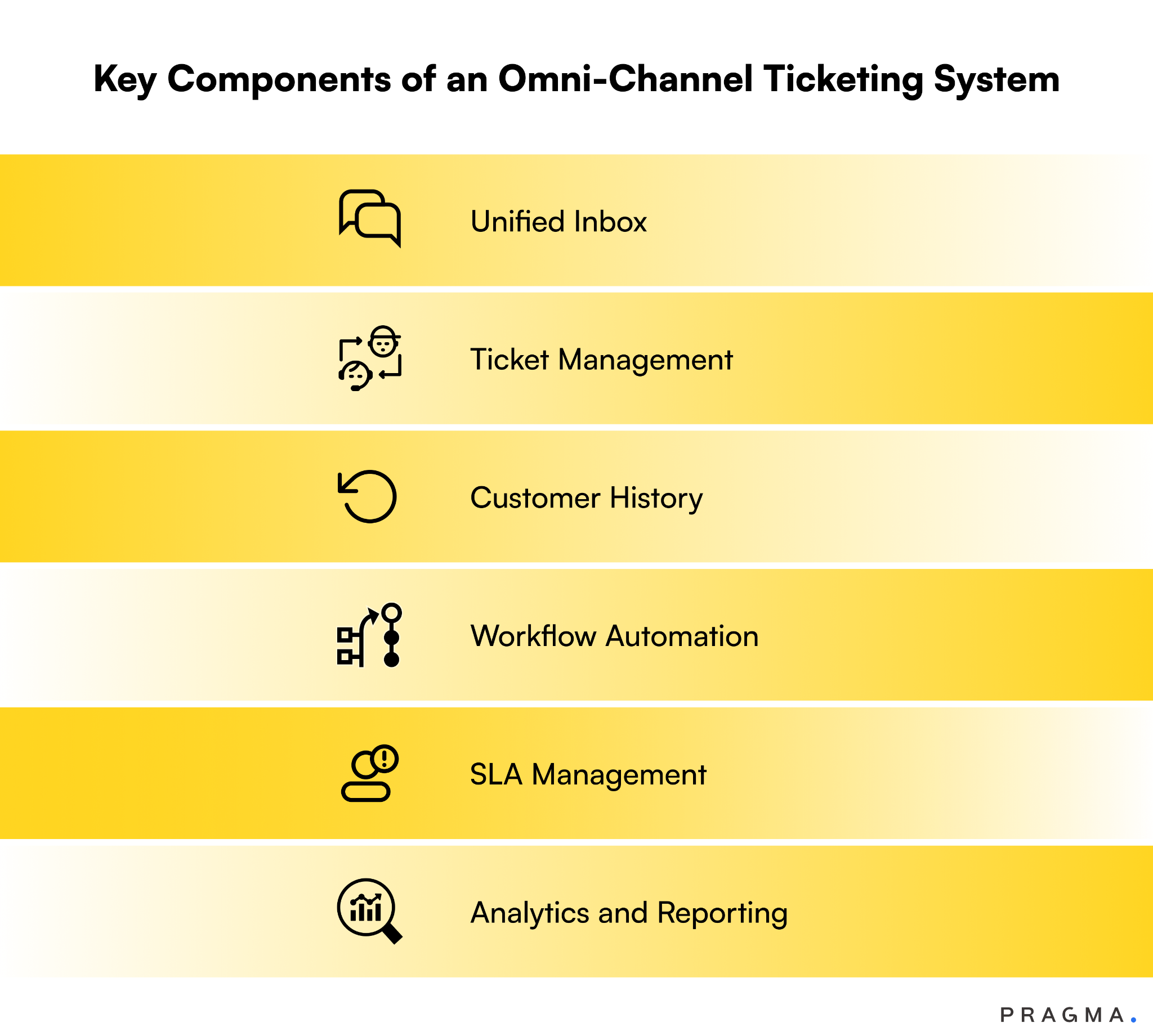
The following are the key components of an omnichannel ticketing system:
Unified Inbox
All messages from all channels arrive in one shared inbox. Agents see every open ticket, its current status, its priority level, and who is handling it.
Working on the same feature, Pragma Omnichannel CRM brings WhatsApp, Facebook Messenger, Instagram, email, and VoIP into one single inbox.
Brands like Rare Rabbit and Neeman's use this to manage high volumes of customer conversations without assigning dedicated individuals to each channel separately.
Ticket Management
Each ticket carries :
- a unique ID
- a status
- a priority level
- an assigned agent
Managers see the full queue at a glance and redistribute workload when one agent is getting buried while another has capacity sitting idle.
Customer History
Every ticket shows the customer's full interaction history, including:
- previous support conversations
- order details, return requests
- payment issues
- or other issues
Agents respond with complete context from the very first message they send.
Pragma Omnichannel CRM's right panel makes this automatic. Past and present order details appear alongside the live conversation. Agents do not need to open a separate CRM or order management tool. Everything is already there when they open the ticket.
Workflow Automation
With proper automation, tickets get categorised and assigned without the need for any manual input. Follow-up messages go out on schedule. SLA breach alerts notify the right people before deadlines are missed.
Auto-responders handle agent unavailability on holidays and weekends. Only brands have to build up the message once. Customers get an immediate response even when your team is completely offline.
SLA Management
Service Level Agreements define how fast your team must respond and resolve tickets.
The system tracks these deadlines in real time and escalates tickets that are at risk of breaching. This keeps your team accountable and your customers informed.
Analytics and Reporting
The following metrics tell the brand about what is working and what is not:
- Ticket volumes by channel
- average response times
- resolution rates
- agent performance
- Customer satisfaction scores.
With proper performance dashboards, brands can customise the parameters. You see the data that matters for your specific operation.
Which Channels Are Supported by an Omni-Channel Ticketing System?
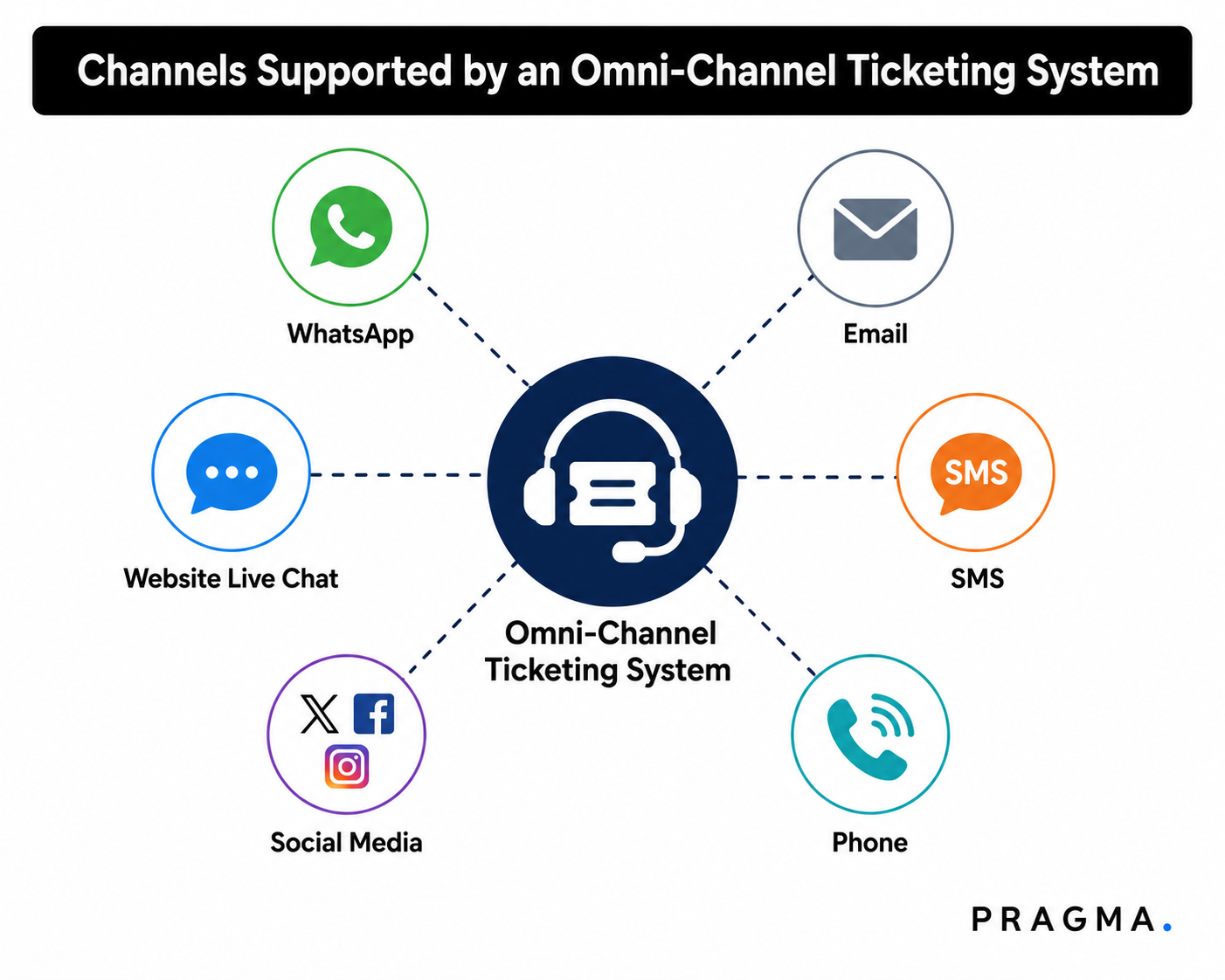
Omnichannel ticketing systems support various modern channels, including the following:
WhatsApp is the dominant support channel for D2C brands in India. 500 million users are actively using it in India; it is where your customers are already spending time and where they expect to reach you when something goes wrong with their order.
Pragma WhatsApp Business Suite directly integrates into your support workflow. Agents handle WhatsApp conversations from the same dashboard they use for email and Instagram.
Chatbots handle order status, payment queries, and return requests automatically in 16+ languages.
Website Live Chat
Live chat captures customers at the moment they are most engaged with your brand.
The queries convert into tickets automatically. If the issue needs follow-up, the ticket stays open, and the agent picks it up later with full context intact.
Social Media
Instagram DMs, Facebook Messenger messages, and social media comments all come into the unified inbox. Agents can do so without leaving the ticketing platform.
Pragma Omnichannel CRM goes further than most systems here. Your team sees comments from across your social media channels directly in the platform.
Quick actions like reply, like, and delete are available without any redirection to the native app.
With emails, brands handle the detailed queries, refund requests, and escalations that need more than a quick reply.
The omnichannel ticketing system converts every inbound email into a ticket, assigns it automatically, and tracks it through to resolution.
SMS
SMS handles transactional updates and quick follow-ups.
An omni-channel system logs SMS conversations alongside every other channel so the full customer history stays intact regardless of where the conversation happened.
Here is a catch: all of the above channels are supported by Pragma Omnichannel CRM, where brands can have a unified view of customers, and the rich data helps flag impulse buyers, fake orders and orders made by bots.
Omni-Channel Ticketing System Example
Let us understand more about the omnichannel ticketing system with the help of the following example:
We are assuming that a customer named Riya orders shoes from your brand. Three days later, she messages your WhatsApp number asking why her order has not shipped yet.
The system creates a ticket instantly, pulls in her order details, and routes it to your logistics team based on your assignment rules.
The logistics agent opens the dashboard and sees Riya's full order history, her previous interactions, and her current order status in the right panel. The agent replies directly from the dashboard. Riya gets a response in under 5 minutes.
Two days later, you see that Riya comments on your Instagram post. She gets the shoes, but the size is wrong. The CRM captures Riya's complaint, creates a new ticket, links it to Riya's existing customer profile, and routes it to your returns team.
The agent sees her previous WhatsApp conversation and her order details without asking Riya to explain anything again. The exchange gets initiated in one interaction.
Riya gets her replacement and leaves a positive review about your brand, and becomes a loyal customer of your brand.
And this happens because her complaint is tackled in a much better way, so she does not get any frustrations, and all of this happens because of an efficient omnichannel CRM.
Omni-Channel Ticketing System vs Multi-Channel Support
Before choosing a customer support system, it is important to know the difference between an omnichannel ticketing system and a multi-channel ticketing system.
Both let you talk to customers on different platforms, but they work in different ways.
Here is a simple comparison.

Benefits of an Omni-Channel Ticketing System for E-commerce
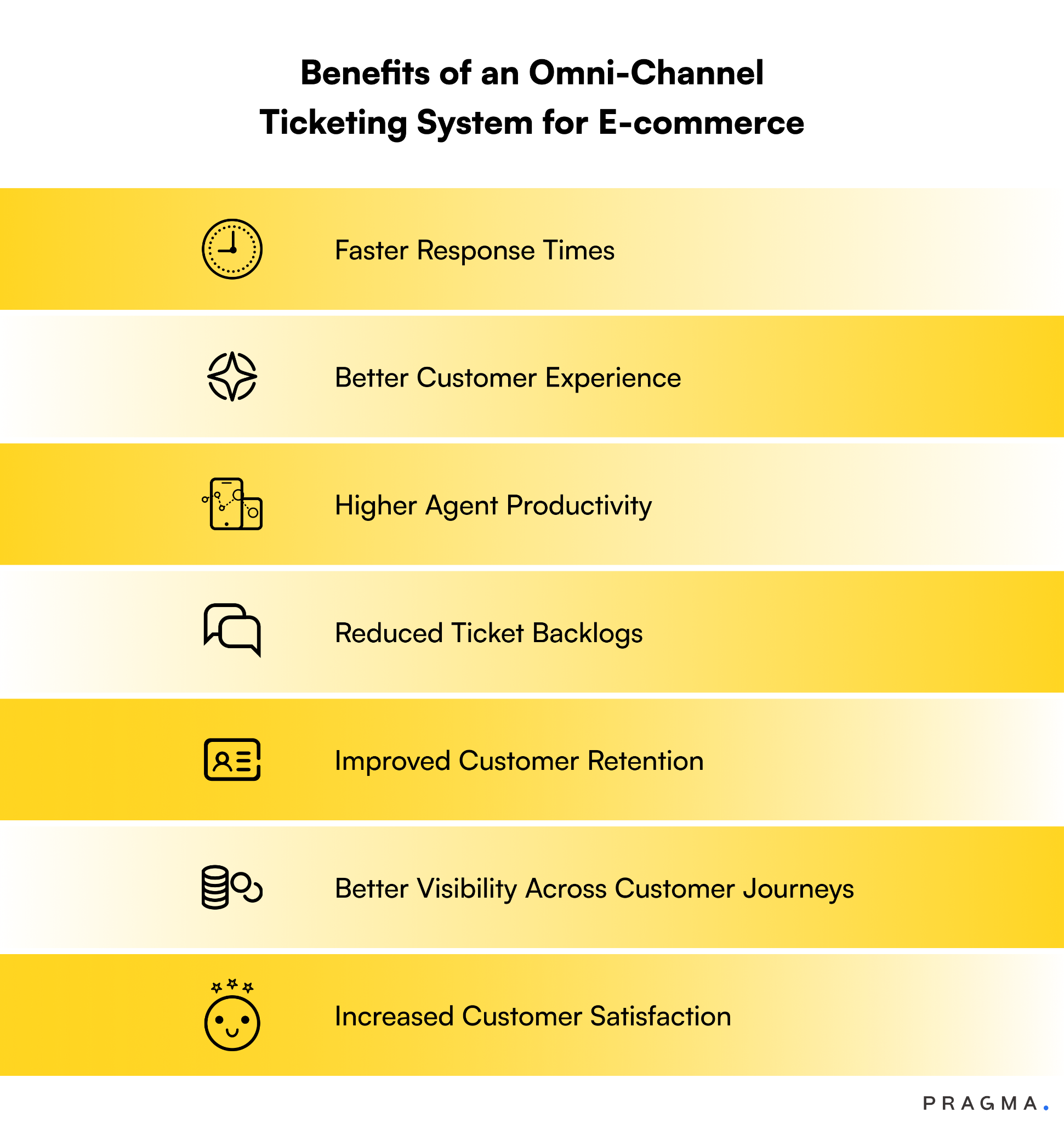
With the use of a robust omnichannel ticketing system, Indian e-commerce brands can have the following benefits:
Faster Response Times
When there is automated ticket creation, intelligent routing, and chatbot handling of routine queries, things become easy.
Freshdesk data shows AI-powered ticketing systems help businesses respond up to 83% faster.
Pragma's chatbots deliver instant responses on WhatsApp, Instagram, and Messenger around the clock. Customers get answers immediately. Agents handle only the queries that genuinely need them.
The math on this is simple. If 95% of your queries are automatable and you are still handling them manually, you are paying people to do work that a system should be doing.
Better Customer Experience
With omnichannel CRM, customers do not have to repeat themselves. Agents have full context before they type a single word. Responses are accurate and relevant to that specific customer's history with your brand.
Shopify research shows D2C brands with a solid omni-channel strategy reduce their cost per contact by 7.5% annually while delivering a better experience at the same time.
Higher Agent Productivity
Working from one screen instead of five changes how much an agent gets done in a day.
It sounds like a small thing. The productivity impact is not small at all.
Automation handles repetitive work. It means no agent wastes time on manual ticket sorting. The Pragma Omnichannel CRM agent hierarchy and performance dashboard give managers full visibility into workload distribution, so no agent is overwhelmed while another sits idle.
Reduced Ticket Backlogs
With the help of omnichannel CRMs:
- Brands can resolve common queries instantly, 24 hours a day, 7 days a week.
- Automation routes tickets to the right agent immediately.
- SLA tracking prevents tickets from sitting unattended for hours while customers grow increasingly frustrated waiting for a response that is not coming.
- During peak sale periods, your team handles only the complex cases while the system manages the volume spike.
Improved Customer Retention
The Forrester data shows a 35% increase in retention for omnichannel brands. For D2C businesses where customer acquisition costs keep climbing, keeping existing customers is the most cost-effective growth move available.
It is being found that acquiring a new customer costs brands 5 to 7 times more than retaining an existing one.
Pragma helps D2C brands retain up to 89% of their customers by keeping them engaged across their preferred channels throughout the post-purchase journey.
Better Visibility Across Customer Journeys
Every interaction across every channel gets logged and linked to the customer profile.
Brands can see exactly how a customer moved from Instagram to WhatsApp to email. By this, they can spot where friction occurs and address it before it becomes a churn risk.
Increased Customer Satisfaction
A positive support experience makes customers 3.5x more likely to repurchase, according to G2 research.
FOY Naturals, a skincare and haircare D2C brand, saw measurable improvement in customer satisfaction after implementing Pragma's omni-channel CRM.
Co-founder Sana Shaikh noted that Pragma helped the brand stay consistently in touch with customers throughout checkout and post-sales.
Common E-commerce Support Challenges Solved by Omni-Channel Ticketing
As every work has its own sort of challenges, similarly, when providing customer support, e-commerce brands face many challenges, but the good news is that they can be solved easily through omnichannel ticketing systems.
Have a look at the following challenges, which can be sorted with omnichannel CRMS:
High Ticket Volumes
During the festive sales, new product launches, and flash sales, the ticket volume can spike to a large extent.
This spike overwhelms teams that are using manual processes. This is predictable. It happens every single time. And yet most D2C brands are still not structurally prepared for it when it arrives. Every year, they get the same chaos.
But if they have an efficient ticketing system, with automation and chatbot support, it can absorb that surge without requiring additional headcount.
Delayed Responses
It is obvious that delayed responses drive negative reviews. And it is much faster than almost any other support failure.
A customer who waits 4 hours for a response on a simple order status query is not just frustrated. They are actively forming a negative opinion of your brand that they will share with other people when given the opportunity.
But automated ticket creation, instant chatbot responses, and SLA tracking can eliminate these delays caused by manual sorting and assignment.
Duplicate Conversations
Without a unified system, the same customer query gets picked up by two agents who have no visibility into each other's work.
This wastes time, creates confusion, and sometimes produces contradictory responses that can damage customers' trust.
But with proper omnichannel CRMs, such issues will never exist as all the chats will be summed up in a unified inbox to which every team member will have a shared view.
Order Status Queries
Order status is the single most common support query for D2C brands. It is also the most automatable.
And yet most brands still have human agents answering it manually hundreds of times a day because nobody has set up the automation to handle it.
But omnichannel CRMs can pull real-time order status from your order data and deliver it to the customer on WhatsApp or Instagram without any agent involvement.
Inconsistent Service Across Channels
A customer who gets a fast response on WhatsApp but waits 48 hours for an email reply notices the gap immediately.
It signals disorganisation and erodes customer trust.
But a unified platform with SLA tracking across all channels can keep your response standards consistent regardless of where the customer reaches out.
So, as you can see, the above challenges will seem familiar to you if you are still dependent on manual resources. Having an efficient omnichannel CRM like Pragma Omnichannel CRM can solve all these issues by providing a unified shared inbox, supporting multiple tickets and agents with hierarchy-based assignments, personalised chatbots available in 16 languages, automated responses, and much more.
Final Thoughts
So, let us conclude here! From the above discussion, it is made clear that D2C brands need a proper omnichannel ticketing system that can handle daily queries without creating any chaos.
Because relying only on manual resources is not justifiable in this modern world, brands that adopt such systems are far better at working and handling things on every platform.
Pragma Omnichannel CRM connects WhatsApp, Instagram, Facebook Messenger, email, and VoIP into one platform built specifically for D2C brands. So, now you don't have to worry about anything more for your customer support!

FAQs (Frequently Asked Questions On Omni-Channel Ticketing System: A Complete Guide for E-commerce Customer Support)
1. What is an omnichannel ticketing system?
An omnichannel ticketing system is customer support software that centralises customer queries from channels such as WhatsApp, email, live chat, social media, websites, and phone into a single dashboard, allowing support teams to manage every conversation from one place.
2. How does an omnichannel ticketing system work?
An omnichannel ticketing system automatically captures customer enquiries from multiple channels, converts them into support tickets, routes them to the right agents, tracks resolution progress, and maintains a unified conversation history.
3. Why do eCommerce brands need an omnichannel ticketing system?
eCommerce brands need an omnichannel ticketing system to manage growing support volumes, reduce response times, eliminate fragmented conversations, improve agent productivity, and deliver consistent customer experiences.
4. What are the benefits of using an omnichannel ticketing system?
Key benefits include faster ticket resolution, unified customer conversations, improved team collaboration, automated ticket routing, better customer satisfaction, support analytics, and increased operational efficiency.
5. What channels can be integrated into an omnichannel ticketing system?
Most omnichannel ticketing systems support WhatsApp, email, live chat, Instagram, Facebook Messenger, SMS, websites, mobile apps, voice support, and other customer communication channels.
6. How does an omnichannel ticketing system improve customer support?
An omnichannel ticketing system gives agents complete visibility into customer interactions across every channel, enabling faster resolutions, personalised support, and a more consistent customer experience.
7. What features should businesses look for in omnichannel ticketing software?
Important features include shared inboxes, automated ticket assignment, SLA management, CRM integration, conversation history, AI-powered routing, internal collaboration tools, analytics, and workflow automation.
8. How does an omnichannel ticketing system integrate with CRM software?
CRM integration synchronises customer profiles, order history, previous conversations, and support interactions, giving agents the context needed to resolve issues more efficiently.
9. How can automation improve omnichannel ticket management?
Automation improves ticket management by assigning tickets automatically, prioritising urgent cases, triggering workflows, sending customer updates, reducing manual work, and improving response times.
10. What metrics should eCommerce brands track in an omnichannel ticketing system?
Key metrics include first response time, average resolution time, first contact resolution, SLA compliance, customer satisfaction (CSAT), ticket backlog, agent productivity, and ticket resolution rate.
Talk to our experts for a customised solution that can maximise your sales funnel
Book a demo

.png)