

Most customer support teams didn’t set out to choose between humans and automation. They chose chatbots to handle volume, reduce costs, and keep response times in check. Over time, those chatbots grew more complex, more scripted, and more disconnected from how real agents actually work. As AI entered the picture, the conversation shifted again from automation to assistance, from replacement to augmentation.
That shift is at the heart of AI Copilot vs Traditional Chatbots: Why Agents Still Stay in Control. Whilst both promise efficiency, they operate on fundamentally different assumptions about trust, context, and decision-making. Traditional chatbots aim to resolve issues autonomously. AI copilots are designed to sit alongside agents, guiding actions without taking control away.
For D2C brands managing high-volume, high-variance support queries, this distinction matters more than it first appears. Especially when layered into CRM workflows, order history, and customer context, the choice directly affects resolution quality, escalation rates, and agent productivity. To understand where each approach fits and where it breaks we need to delve into how control, context, and accountability are actually handled on the support floor.
Why did traditional chatbots become the default for support automation?
Early automation optimised for scale, not operational nuance
Traditional chatbots emerged at a time when support teams were overwhelmed by volume and limited by headcount. The promise was simple. Automate repetitive queries, deflect tickets, and reduce cost per interaction. For many D2C brands, especially during high-growth phases, this felt like a necessary trade-off.
Chatbots were designed to operate independently. They relied on predefined flows, intent detection, and decision trees to resolve issues without human intervention. This worked reasonably well for narrow, predictable use cases like order status checks or return policy FAQs.
However, the moment queries required judgment, context, or cross-system validation, the model began to strain. Instead of reducing workload, chatbots often created secondary work in the form of escalations, corrections, and customer dissatisfaction. The system was efficient at answering questions, but brittle when handling real-world variability.
This is where the early fault lines in AI copilot vs chatbots first appeared.
How do traditional chatbots actually operate behind the scenes?
Rule-driven flows prioritising closure over correctness
Most traditional chatbots follow a deterministic architecture. An input is mapped to an intent, the intent triggers a scripted flow, and the flow ends with a predefined resolution or escalation.
Key characteristics include:
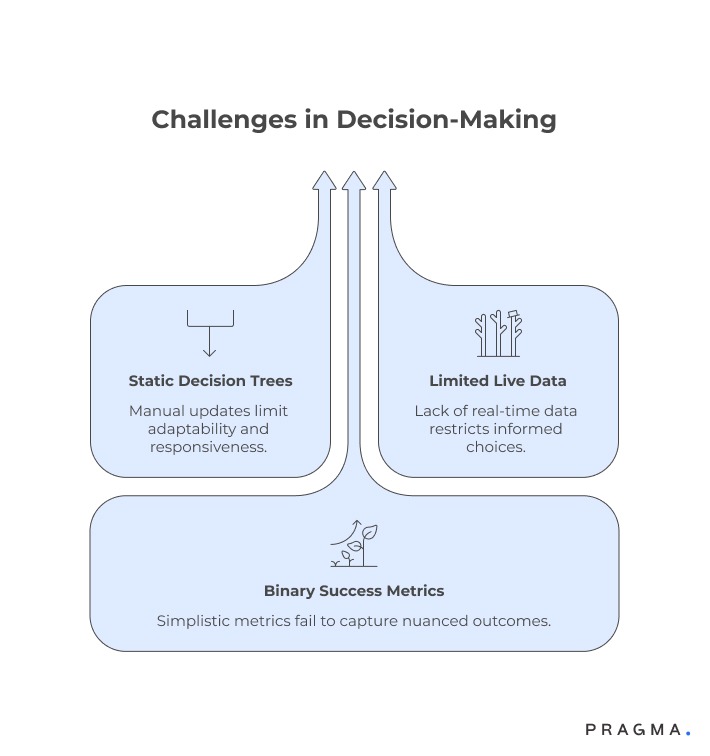
- Static decision trees that require manual updates
- Limited ability to reference live operational data
- Binary success metrics such as resolution or handoff
Because these systems aim to act autonomously, they optimise for closure speed rather than resolution quality. A chatbot that ends a conversation quickly is often marked as successful, even if the customer issue remains unresolved.
This becomes problematic in D2C environments where:
- Orders change status frequently
- Return and exchange rules vary by SKU
- Customer history materially affects resolution paths
Without deep, real-time context, chatbots guess. When they guess wrong, agents inherit confused conversations instead of clean handoffs. This is one of the most visible differences when teams evaluate the difference between AI copilot and chatbots in live operations.
Why does autonomy become a liability in complex support workflows?
Loss of context creates downstream operational friction
Autonomous systems work best when rules are stable and exceptions are rare. Customer support is rarely either. As brands scale, edge cases multiply faster than flows can be updated.
Common failure modes include:
- Incorrect promises around refunds or delivery timelines
- Inability to factor in previous interactions
- Repetitive questioning that frustrates customers
More importantly, chatbots operate outside the agent’s workflow. They collect information, but do not assist decision-making in real time. Agents must still verify data across systems, reinterpret the issue, and correct earlier missteps.
This disconnect is especially visible when chatbots are loosely integrated with CRM systems. Context exists, but it is not actively surfaced or applied. The result is a fragmented experience for both customers and agents. This sets the stage for why support teams began exploring copilots that live inside agent tools rather than in front of customers alone.
This shift becomes clearer when comparing AI Copilot vs Traditional Chatbots in environments where agents remain accountable for outcomes.
When do support teams start questioning chatbot-led automation?
Escalation costs and agent frustration outweigh efficiency gains
Teams typically reassess their chatbot strategy when indirect costs become visible. These are not line items on a dashboard, but patterns agents experience daily.
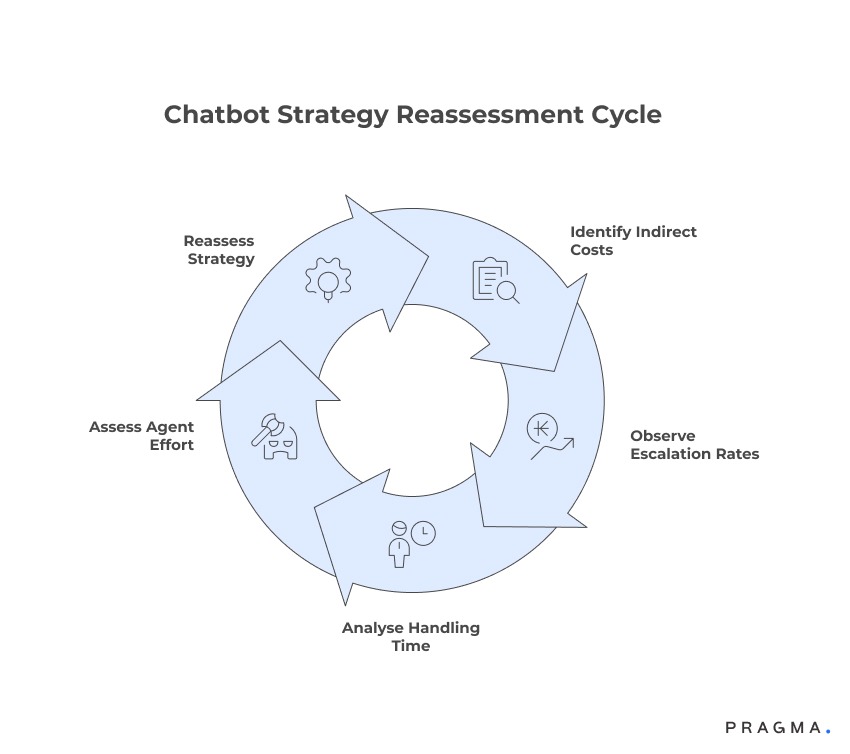
Signals include:
- Rising escalation rates despite high chatbot containment
- Increased average handling time post-handoff
- Agents spending time undoing automated responses
At this stage, leaders realise that automation without assistive intelligence simply moves effort around the system. The focus begins to shift from replacing agents to enabling them.
This is where copilots enter the conversation, not as a replacement layer, but as an augmentation layer. Unlike chatbots, copilots are designed to operate within agent workflows, pulling context from CRM, order systems, and past interactions.
How does an AI copilot differ from a traditional chatbot in daily operations?
Assistive intelligence embedded inside agent decision workflows
An AI copilot is not designed to resolve conversations autonomously. Its primary role is to support agents whilst they remain in control of decisions, communication, and outcomes. Instead of sitting in front of the customer, copilots sit inside agent tools.
Operationally, this changes everything.
Rather than forcing customers through scripted paths, copilots observe context and suggest next best actions. They surface relevant information, recommended responses, and policy checks exactly when the agent needs them. The agent decides what to apply and what to ignore.
This distinction defines the core of AI Copilot vs Traditional Chatbots. One acts independently. The other collaborates.
Why does keeping agents in control improve resolution quality?
Human judgment combined with machine context reduces costly errors
Customer support involves nuance that is difficult to encode into rules. Tone, customer history, edge cases, and commercial judgment all matter. When systems act autonomously, they often fail in these grey areas.
By keeping agents in control, copilots allow teams to:
- Apply judgment on exceptions
- Adapt responses based on customer value or history
- Prevent incorrect commitments around refunds or replacements
Copilots enhance, rather than override, agent expertise. They ensure that relevant data is visible at the moment of decision, without forcing a predefined outcome. This is particularly valuable in high-stakes scenarios like returns, escalations, or failed deliveries.
This approach explains why many teams exploring AI copilot vs chatbots shift their evaluation criteria from automation rates to resolution accuracy.
How do copilots handle context that chatbots struggle with?
Real-time synthesis across systems instead of scripted recall
Traditional chatbots struggle with fragmented data. Even when integrated with back-end systems, they typically retrieve information in isolation. Copilots take a different approach by synthesising context across multiple sources simultaneously.
This includes:
- Order history and current status
- Previous conversations and resolutions
- CRM attributes and customer tags
Instead of asking customers to repeat themselves, copilots proactively surface this context for agents. For example, copilots can retrieve past order details or previous complaints before an agent even opens the ticket.
This capability directly addresses one of the most common complaints about chatbots: repetition without understanding. It also highlights the difference between AI copilot and chatbots at an architectural level.
When does a copilot outperform even advanced conversational bots?
High-variance scenarios where rules break faster than models
Advanced chatbots can handle language well, but language fluency does not equal operational correctness. In scenarios where policies vary by SKU, region, or time window, static logic quickly becomes outdated.
Copilots excel in situations such as:
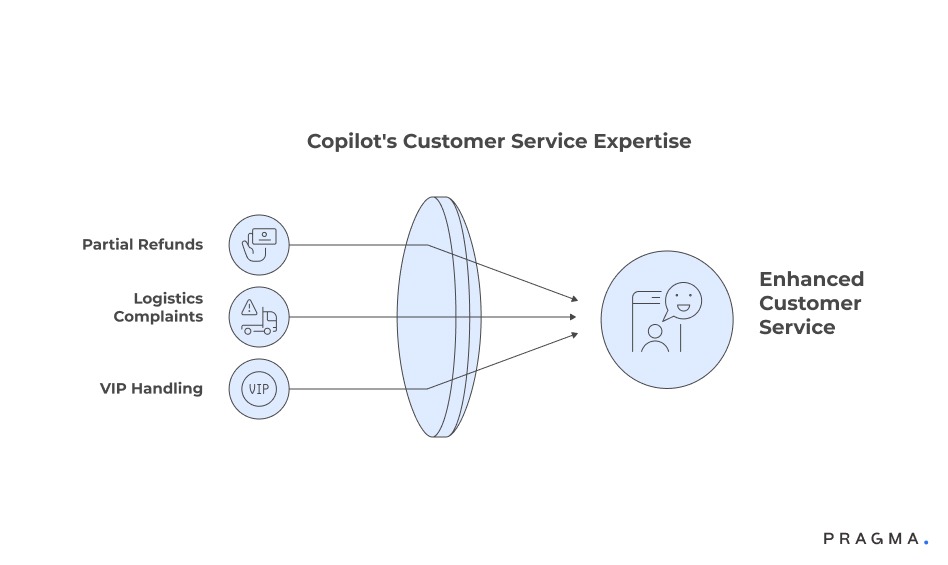
- Partial refunds or conditional exchanges
- Repeat complaints tied to logistics partners
- VIP customers requiring discretionary handling
Because copilots do not commit actions independently, they reduce the risk of system-driven errors. Agents remain accountable, but are better informed. This balance is why many teams evaluating AI copilot vs traditional chatbots vs Microsoft Copilot focus on where control resides rather than how conversational the system sounds.
Why do copilots integrate more naturally with agent workflows?
Designed around existing tools, not bolted on top
Chatbots are often layered onto support stacks as a separate interface. Copilots are embedded within tools agents already use, such as ticketing systems and CRMs.
This allows copilots to:
- Suggest replies directly inside ticket views
- Highlight relevant policies without context switching
- Reduce manual lookups across dashboards
When copilots are integrated properly, agents spend less time searching and more time resolving.
This design philosophy reinforces why copilots scale with complexity, whilst chatbots tend to plateau. As D2C operations mature, the emphasis shifts from deflection to decision support. That shift is central to understanding AI Copilot vs Traditional Chatbots in real-world deployments.
How can teams operationalise copilots without disrupting support velocity?
Structured rollout that improves decisions before automating outcomes
Adopting a copilot model is less about introducing new technology and more about rethinking where intelligence sits in the workflow. Teams that succeed start by identifying moments where agents already pause, verify, or escalate. These moments signal decision complexity, not volume.
Instead of replacing these steps, copilots are layered in to reduce friction. They surface context, suggest responses, and flag policy constraints, whilst leaving final actions with the agent.
In practice, this often begins inside the CRM. When copilots can read customer attributes, ticket history, and order data in one view, agents spend less time assembling context and more time resolving issues accurately.
The goal is not faster replies at any cost. It is fewer corrections, fewer escalations, and more consistent outcomes across agents.
How should teams redesign workflows around assistive intelligence?
Optimising human judgment rather than bypassing it
Copilot-led workflows work best when teams accept that not every interaction should be automated. Instead, they focus on reducing cognitive load for agents handling complex cases.
Effective redesign usually involves:
- Defining which decisions require human approval
- Clarifying where copilots can suggest versus act
- Aligning policies so recommendations remain consistent
For example, when handling returns or delivery disputes, copilots can pre-fill eligibility checks and surface relevant past orders without committing to an outcome. This reduces error rates whilst maintaining flexibility. Accessing historical order context in real time, as shown in, becomes especially valuable here.
By designing workflows around assistance rather than autonomy, teams avoid the trap of over-automation that often surfaces in AI copilot vs chatbots evaluations.
How does this shift change performance measurement?
Accuracy and agent confidence replace raw containment metrics
Traditional chatbot success is often measured by deflection and containment. Copilot success requires different lenses. Since agents remain in control, teams must measure how effectively intelligence improves outcomes.
Key performance indicators typically evolve to include:
- Reduction in post-resolution corrections
- Lower escalation rates for complex tickets
- Improved first-contact resolution on high-variance issues
These metrics align more closely with real customer satisfaction and internal efficiency. They also make the difference between AI copilot and chatbots visible beyond conversational polish.
How can support teams improve decision quality in 30 days?
Immediate operational improvements without platform overhauls
Week 1: Map high-friction decision points
Audit the top ticket categories where agents frequently escalate or seek approvals. Document what information they need but do not have at hand.
Expected result: Clear identification of where a copilot adds immediate value.
Week 2: Centralise context inside the agent view
Ensure order history, previous interactions, and customer tags are visible within a single screen. Avoid forcing agents to switch tools.
Expected result: Reduced handling time and fewer repeated questions to customers.
Week 3: Standardise recommendations, not actions
Define response suggestions and policy checks that copilots can surface, without enabling auto-actions.
Expected result: Consistency across agents without loss of judgment.
Week 4: Train agents on assisted decision-making
Coach agents on when to rely on copilot suggestions and when to override them. Make feedback loops explicit.
Expected result: Higher agent confidence and cleaner resolutions.
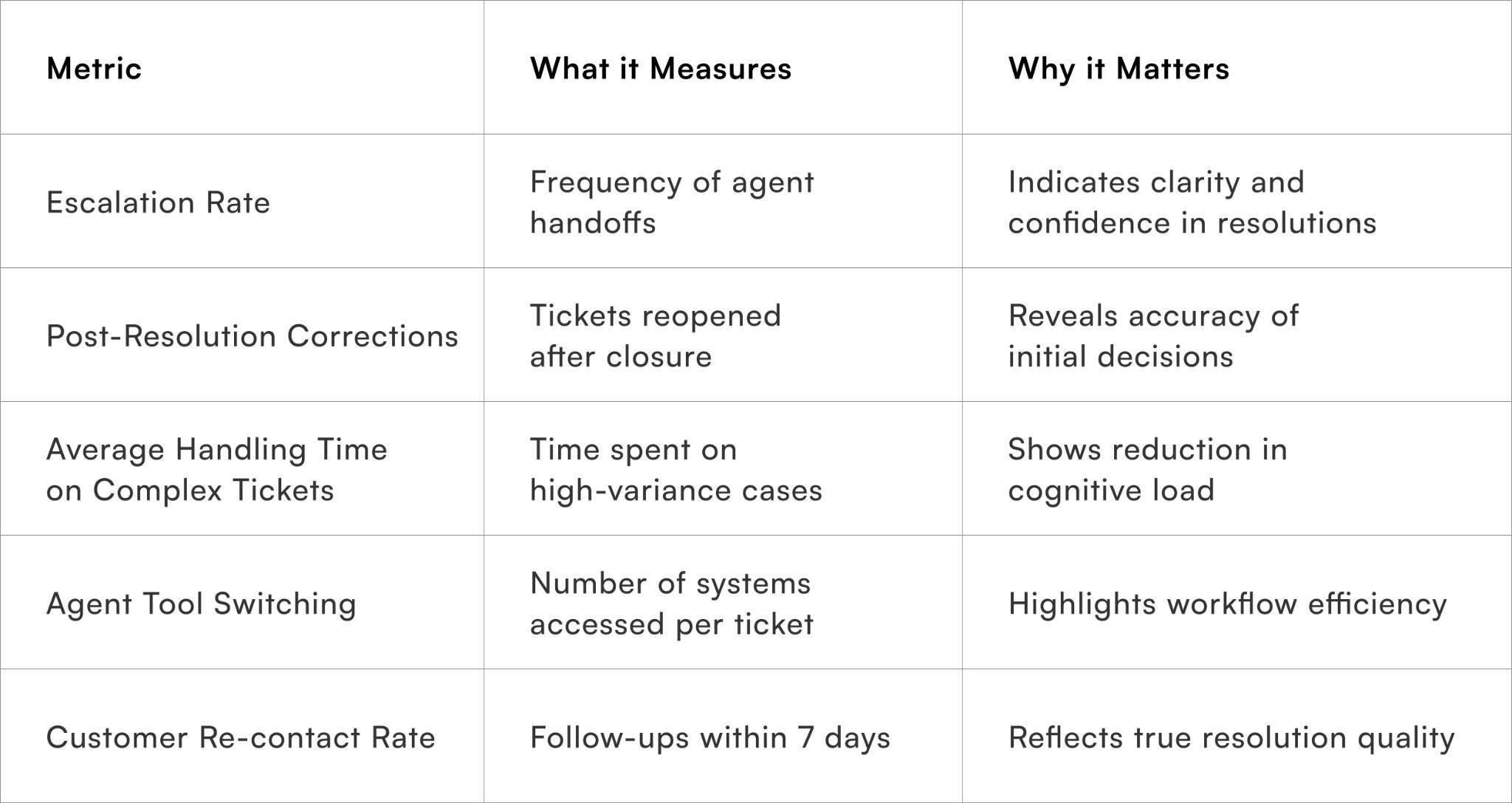
Which metrics indicate whether copilots are working?
Signals that reflect decision quality, not just speed
To Wrap It Up
The debate around AI copilot vs traditional chatbots is ultimately about where intelligence should sit in customer support operations. Autonomous systems optimise for closure, whilst assistive systems optimise for better decisions.
This week, identify one high-friction support scenario and pilot copilot-led assistance without enabling auto-actions.
Over the long term, teams that continuously refine recommendations, feedback loops, and context visibility see compounding gains in resolution quality and agent confidence. Copilots mature alongside operations, rather than breaking as complexity grows.
For D2C brands seeking consistent, high-quality support decisions, Pragma's AI Copilot platform provides contextual intelligence, CRM-native integration, and agent-first workflows that help brands reduce escalations and improve first-contact resolution at scale.

FAQs (Frequently Asked Questions On AI Copilot vs Traditional Chatbots: Why Agents Still Stay in Control)
1. What is the difference between AI copilot and chatbots?
The difference between AI copilot and chatbots lies in autonomy and control.AI copilots assist human agents, while chatbots operate independently with predefined flows.
2. AI copilot vs traditional chatbots: which is better for businesses?
In the AI copilot vs traditional chatbots debate, copilots offer more flexibility and contextual support. Chatbots are better suited for repetitive, rule-based interactions.
3. How does AI copilot vs chatbots impact customer support teams?
AI copilot vs chatbots shows that copilots enhance agent productivity without replacing them. Chatbots handle basic queries but lack deep contextual understanding.
4. AI copilot vs traditional chatbots vs Microsoft Copilot: how do they compare?
AI copilot vs traditional chatbots vs Microsoft Copilot highlights that copilots integrate deeply with workflows and tools. Traditional chatbots are limited, while platforms like Microsoft Copilot extend AI assistance across systems.
5. Why do agents stay in control with AI copilots?
AI copilots provide suggestions and insights, but final decisions remain with human agents. This ensures accuracy, accountability, and better customer experience.
6. When should businesses use chatbots instead of AI copilots?
Chatbots are ideal for high-volume, simple queries like FAQs or status updates. They reduce workload but offer limited personalisation.
7. How do AI copilots improve decision-making?
They analyse data, customer history, and context in real time. This helps agents make faster and more informed decisions.
8. Can AI copilots replace traditional chatbots completely?
Not entirely, as both serve different purposes within a communication strategy. Copilots complement chatbots rather than fully replacing them.
9. What are the limitations of traditional chatbots?
Traditional chatbots rely on predefined scripts and struggle with complex queries. They often lack adaptability and contextual awareness.
10. How does personalisation differ in AI copilot vs chatbots?
In AI copilot vs chatbots, copilots deliver highly contextual and personalised responses. Chatbots provide standardised replies with limited customisation.
11. What data powers AI copilots compared to chatbots?
AI copilots use richer datasets including CRM data, behaviour signals, and interaction history. Chatbots typically rely on rule-based inputs and structured flows.
Talk to our experts for a customised solution that can maximise your sales funnel
Book a demo


.png)