

Most D2C brands in India have invested heavily in CRM systems. Orders, delivery updates, WhatsApp conversations, support tickets, refunds, complaints and escalations are all captured diligently. On paper, teams have rich customer visibility. In reality, very little of this information changes what actually happens on the ground.
How to map CRM events to operational triggers (NDRs, returns, SLA breaches) addresses this disconnect. The problem is not lack of data, but lack of translation. CRM events describe what happened, but operations still rely on manual follow-ups, spreadsheets and gut feel to decide what to do next. This delay is where costs creep in through avoidable reattempts, unnecessary returns, and SLA breaches that could have been prevented early.
This blog explains how to convert CRM events into clear operational triggers that automatically initiate the right workflow at the right time. The focus is not tooling, but thinking: deciding which events matter, what action they should trigger, and how to design these mappings without overwhelming teams or customers.
Why do CRM events fail to influence operations today?
Visibility exists, ownership does not
Most teams assume that if an event is logged in the CRM, it will naturally lead to action. In practice, the opposite happens. Events are recorded, acknowledged, and then forgotten as teams move on to the next task.
One reason is that CRM systems are optimised for logging interactions, not for driving decisions. A missed delivery call, an angry WhatsApp message, or a “where is my order” ticket all sit in the system, but none of them explicitly tell operations what must happen next. Without defined consequences, events become passive records.
Another issue is organisational separation. CX teams live inside the CRM, while logistics, warehouse and returns teams operate inside OMS, TMS or courier dashboards. When events cross system boundaries without clear triggers, humans become the glue — forwarding tickets, sending emails, and chasing follow-ups. This manual routing introduces delay, inconsistency and fatigue.
What does it actually mean to map CRM events to operational triggers?
Turning signals into instructions, not alerts
An operational trigger is not a notification. It is a decision rule that converts an event into a concrete action, without waiting for human interpretation.
For example, a CRM event might say that a customer did not answer a rider’s call. On its own, this information does nothing. When mapped correctly, that same event can trigger a specific workflow: pause the next delivery attempt, send a WhatsApp confirmation message, and only release the order for reattempt once the customer responds.
The key difference is intent. Events describe reality, while triggers change outcomes. A well-designed trigger clearly defines what condition occurred, what action must follow, and within what time window. When this logic is explicit, teams stop reacting emotionally and start executing consistently.
Without this mapping, CRMs become reporting tools rather than operational systems.
How CRM-to-Ops Mapping Improves Customer Experience?
Customers expect brands to act quickly when they report a problem. Simply recording an issue in the CRM is not enough if no action follows. CRM-to-Ops mapping helps businesses respond faster by automatically starting the right workflow when an important customer event occurs.
For example, a missed delivery call can trigger a confirmation message, while a return request can start the return process immediately. Faster action reduces waiting time, avoids repeated follow-ups, and gives customers a smoother experience from purchase to delivery.
Which CRM events deserve operational triggers?
High-signal events, not high-volume noise
Not every CRM event should trigger action. If everything fires a workflow, nothing gets attention. The first step is to identify events that reliably predict cost, failure or escalation.
Events linked to delivery risk are usually the most valuable. These include missed delivery calls, customer-marked unavailability, negative delivery feedback, or complete non-responsiveness across channels. Each of these signals increases the probability of an NDR or eventual RTO if ignored.
Similarly, certain return-related events deserve attention. Immediate return initiation after delivery, repeated selection of the same return reason, or frequent refund follow-ups often indicate higher risk or dissatisfaction. Treating these returns the same as all others leads to leakage or unnecessary friction.
Finally, SLA-related events such as repeated “where is my order” queries or escalations before the promised delivery date are early warning signs. Acting on them early is far cheaper than managing a breach later.
How should CRM events trigger NDR workflows?
Preventing failure is cheaper than fixing it
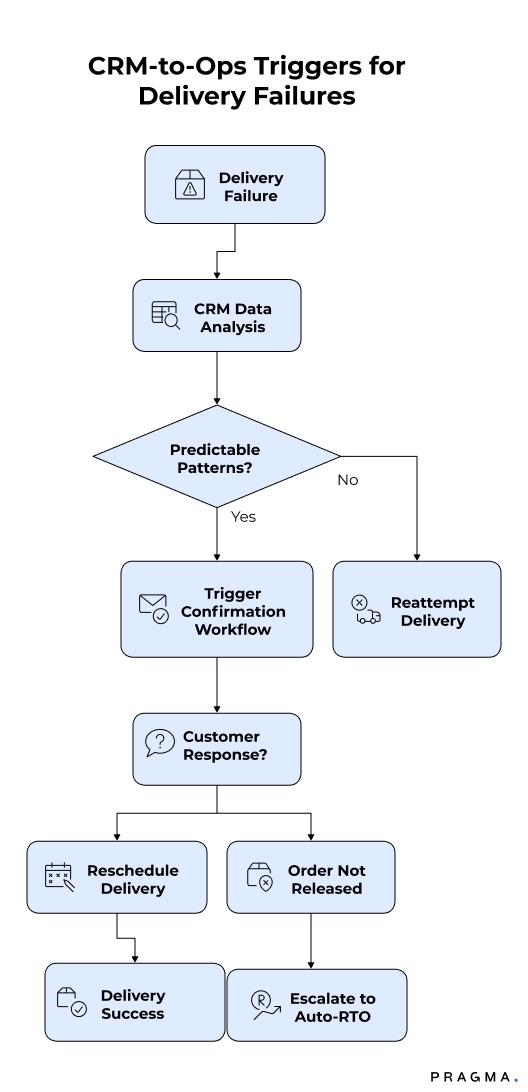
NDRs are one of the clearest use cases for CRM-to-ops triggers. Most NDRs are not random; they follow predictable patterns that show up in CRM data before repeated failures occur.
Missed delivery calls and non-responsiveness
When a rider marks “customer unreachable” or logs a missed call, this should immediately trigger a confirmation workflow. Instead of blindly reattempting the next day, the system should ask the customer to confirm availability and preferred time window. If the customer does not respond within a defined period, the order should not be released for retry.
This approach reduces wasted rider effort and forces intent to surface early. It also protects genuine customers who are responsive but simply missed one call.
Customer-marked unavailability
When customers themselves indicate unavailability through a CRM interaction, the next step should not be another unscheduled attempt. This event should trigger a rescheduling flow with clear options and consequences. If the customer fails to confirm a new window, escalation to auto-RTO becomes justified and defensible.
Mapping these triggers ensures retries are informed, not habitual.
How can CRM events shape smarter return workflows?
Returns should respond to behaviour, not policy alone
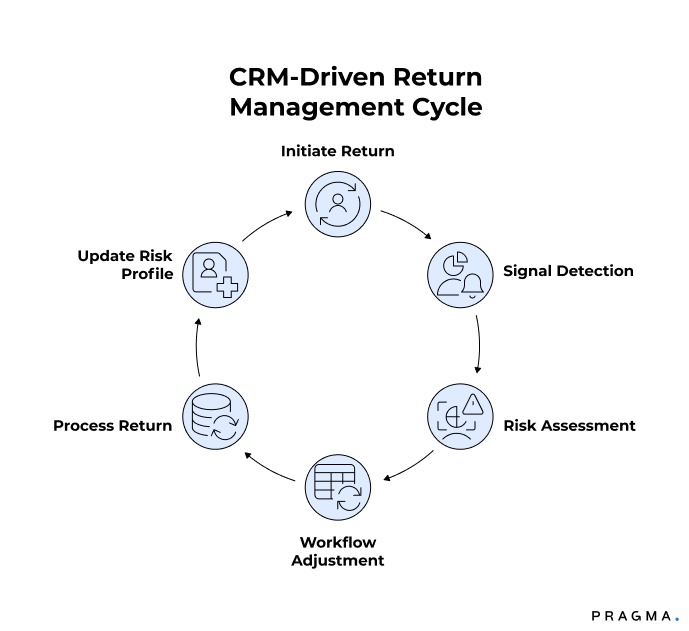
Returns often originate in the CRM but are processed mechanically downstream. This disconnect is where abuse and inefficiency creep in.
When a return is initiated immediately after delivery, that timing itself is a signal. It may indicate a genuine issue, but it also carries higher fraud risk. Mapping this event to a stricter workflow — such as refund after QC instead of instant refund — helps manage risk without blocking the return outright.
Repeated return behaviour is another strong signal. If a customer consistently selects the same return reason or initiates multiple returns in a short span, the CRM event should update their risk profile and influence how future returns are handled. Without this linkage, patterns remain invisible and policies remain blunt.
By tying CRM signals to differentiated return actions, brands can protect margins while keeping the experience fair for genuine customers.
How should CRM events help prevent SLA breaches?
Most SLA breaches announce themselves early
SLA breaches rarely happen out of nowhere. Customers usually sense delay before the system officially crosses an SLA threshold.
Repeated “where is my order” queries, especially across multiple channels, are strong early indicators of dissatisfaction. Instead of responding with templated reassurance, these events should trigger operational checks — shipment prioritisation, courier follow-ups, or proactive delay communication.
Escalations after promised dates should not only trigger apologies. They should also feed back into root-cause analysis, highlighting lanes, couriers or processes that repeatedly underperform. When CRM events are ignored, brands only see SLA failure after the damage is done.
Using CRM events as early warning signals allows teams to intervene while recovery is still possible.
Why Transparent CRM Triggers Build Trust?
Customers feel more confident when they know what will happen after they raise an issue. Clear updates about delivery delays, return requests, or rescheduled deliveries reduce uncertainty and unnecessary support calls.
Instead of waiting for manual responses, customers receive timely notifications and know the next step in the process. This transparency improves communication, builds trust, and shows that the brand is actively working to resolve the issue.
How do you prevent trigger overload and chaos?
One event should not create five actions
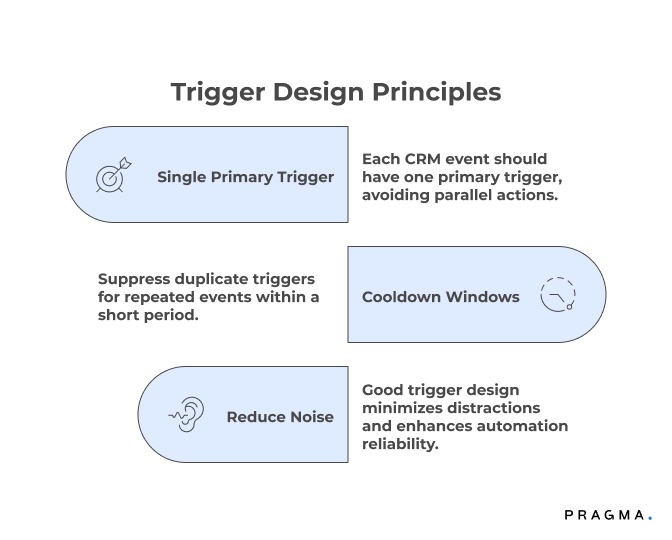
Poorly designed triggers can overwhelm teams just as much as no triggers at all. The key is sequencing and restraint.
Each CRM event should have a single primary trigger, not multiple parallel actions firing across teams. For example, a missed delivery call should first trigger customer confirmation, not immediate ops escalation and CX outreach simultaneously.
Cooldown windows are equally important. If the same event repeats within a short period, the system should suppress duplicate triggers. Without this, teams experience alert fatigue and begin ignoring signals altogether.
Good trigger design reduces noise and increases trust in automation.
Who should own CRM-to-ops trigger design?
Triggers are policies, not tech features
Trigger logic should not be owned solely by tech teams. It is an operational policy decision that affects cost, experience and risk.
Typically, CX operations or central ops teams are best positioned to own this logic, with inputs from logistics, finance and product. Ownership ensures triggers are reviewed, tuned and retired as behaviour and volumes change.
Triggers should be reviewed like any other policy — monthly at minimum. Teams should analyse false positives, missed actions, and customer impact before making changes. Without governance, trigger systems slowly decay into noise.
What metrics show that trigger mapping is working?
Measure outcomes, not activity
The success of CRM-to-ops mapping is not measured by how many triggers fire, but by what stops happening.
Key indicators include reduced repeat NDRs, improved retry success rates, faster return processing, and lower SLA breach percentages. A drop in manual follow-ups and internal escalations is another strong signal that triggers are doing real work.
Most importantly, teams should see clearer accountability. When outcomes improve without increasing workload, trigger mapping is working.
Quick Wins
A grounded rollout without over-automation
Week 1: Identify high-impact CRM events
Audit the last 30–45 days of CRM data and list events that consistently precede NDRs, returns, or escalations. Focus on patterns, not one-off complaints. The goal is to narrow this down to a manageable set of high-signal events that clearly correlate with cost or failure.
Expected result:
Clarity on which CRM events actually deserve operational attention.
Week 2: Define trigger-action rules
For each shortlisted event, document the exact condition, the operational action it should trigger, and the time window in which it must occur. This step forces alignment across CX and ops on what “good handling” looks like.
Expected result:
Reduced ambiguity and fewer ad-hoc decisions by agents.
Week 3: Pilot in a single workflow
Choose one area, such as NDR handling, and activate triggers only there. Monitor how often triggers fire, how teams respond, and whether outcomes improve. Resist the urge to expand scope too quickly.
Expected result:
Early proof of value without overwhelming teams.
Week 4: Review, refine, and scale
Analyse results, identify false triggers, and refine rules before expanding to returns or SLA workflows. This discipline prevents long-term noise and builds confidence in automation.
Expected result:
A stable foundation for broader CRM-driven operations.
Reducing RTO & SLA Breaches Through CRM Event Mapping
Many Return-to-Origin (RTO) cases and SLA breaches can be prevented when customer signals are acted on quickly. CRM event mapping allows brands to identify issues such as missed delivery calls, repeated "Where is my order?" questions, or customer unavailability before they become bigger problems.
These events can automatically trigger actions like confirming delivery timing, rescheduling shipments, or prioritising delayed orders. Acting early improves delivery success, reduces failed attempts, lowers RTO rates, and helps brands meet their promised delivery timelines more consistently.
To Wrap It Up
CRM systems become powerful only when their events drive timely operational action. Mapping events to triggers reduces delays, prevents avoidable failures, and removes manual guesswork from critical workflows.
This week, shortlist five CRM events that repeatedly lead to NDRs, returns or SLA escalations and define explicit operational actions for each.
Over time, refine these mappings using real outcomes, not assumptions. The brands that win are those that act on customer signals early, quietly and consistently.
For D2C brands seeking structured CRM-to-operations orchestration, Pragma’s Workflow Intelligence platform enables event-based triggers across NDRs, returns and SLA management, helping teams reduce manual effort and prevent costly failures.

FAQs (Frequently Asked Questions On How to map CRM events to operational triggers (NDRs, returns, SLA breaches))
1. What is the biggest mistake brands make when using CRM data for operations?
The most common mistake is treating CRM data as a reporting layer instead of a decision layer. Teams log interactions, complaints and delivery updates, but do not define what should change operationally when these events occur. Without explicit trigger-action mapping, CRM data only explains failures after they happen rather than preventing them.
2. Do CRM-to-ops triggers replace human judgement completely?
No, triggers are meant to standardise responses for repeatable scenarios, not eliminate human decision-making. They handle predictable patterns like NDRs, return initiation or early SLA risk, allowing agents and ops teams to focus on genuine exceptions. Human judgement becomes more valuable when routine decisions are automated.
3. How do triggers help reduce NDRs in practice?
Triggers intervene earlier than manual processes. When a missed delivery call or non-responsiveness event fires a confirmation workflow, retries are based on customer intent instead of assumptions. This prevents blind reattempts, reduces wasted rider trips, and surfaces RTO decisions sooner when recovery is unlikely.
4. Will adding triggers increase CX workload or customer messages?
Poorly designed triggers can create noise, but well-scoped triggers usually reduce workload. By automating follow-ups and suppressing unnecessary retries, agents spend less time chasing updates or explaining delays. Customers also receive clearer, more timely communication instead of repeated uncertainty.
5. How do CRM events help manage returns more effectively?
CRM events reveal behavioural context that return policies alone cannot capture. Signals like immediate return initiation, repeated reason codes, or frequent refund follow-ups allow brands to apply differentiated workflows. This helps control abuse while keeping the experience smooth for genuine customers.
6. How often should CRM-to-ops triggers be reviewed or updated?
Triggers should be reviewed at least monthly, or whenever there is a policy, courier, or volume shift. Teams should look at false positives, missed interventions, and CX impact before adjusting logic. Triggers that are not reviewed regularly tend to drift and lose effectiveness over time.
7. Is this approach relevant for smaller or early-stage D2C brands?
Yes, in fact it is easier to implement early. Smaller teams can define clean trigger rules before volumes scale and manual work becomes entrenched. Early discipline prevents operational chaos and costly rework as order volumes grow.
Talk to our experts for a customised solution that can maximise your sales funnel
Book a demo.png)

.png)