

Most CRM copilots fail quietly. They are deployed with impressive demos, connected to “all available data,” and expected to improve productivity overnight. In reality, teams end up with suggestions that are obvious, outdated, or impossible to act on. The issue is rarely the model itself. It is almost always the data feeding it.
Training Your AI Copilot: Data Sources That Actually Improve CRM Efficiency examines why data selection is the real determinant of whether a copilot helps or hinders daily CRM work. When irrelevant, stale, or overly broad inputs dominate, copilots slow agents down instead of supporting them.
The real challenge is deciding which signals deserve attention and which should stay out of the copilot’s view altogether. Only data that reflects current buyer state, operational constraints, and realistic next steps can improve decisions at scale. Anything else may look impressive in theory, but adds friction in practice.
Why more data makes most CRM copilots worse, not better
Efficiency improves when inputs are deliberate, not exhaustive
The myth of “connect everything”
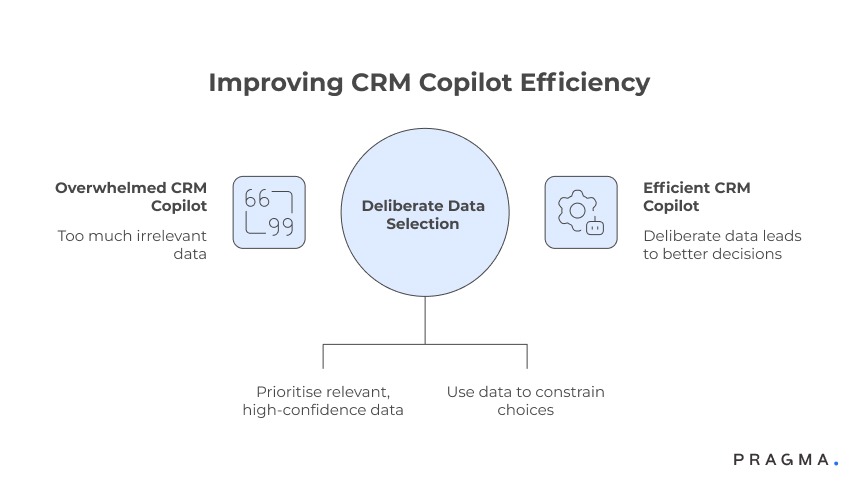
When teams train a CRM copilot, the default instinct is to plug in every available data source — marketing tools, analytics dashboards, support logs, historical reports, and third-party enrichments. The assumption is simple: broader context should lead to better recommendations.
In practice, this overwhelms the copilot with signals that are either outdated, weakly correlated to the task at hand, or irrelevant to the moment the agent is operating in. Instead of accelerating decisions, the copilot produces generic suggestions that agents must mentally filter, adding cognitive load rather than reducing it.
Why agents stop trusting suggestions
Once agents encounter a few low-quality or obvious recommendations, trust erodes quickly. They begin to ignore the copilot altogether, even when it surfaces genuinely useful insights. This is not a UX failure — it is a data selection failure.
CRM efficiency is driven by decision speed, not information volume
CRM work is dominated by small, repeated decisions: who to respond to next, which issue to prioritise, whether escalation is required, or what follow-up action makes sense now. These decisions rarely benefit from broad historical context.
What improves efficiency is timely, high-confidence signals that narrow choices, not expand them. A copilot that presents five possible explanations feels helpful in theory, but one that confidently highlights the most likely constraint is far more useful in practice.
The difference between “contextual” and “actionable”
Context explains the past. Actionable data constrains the present. Copilots trained heavily on explanatory data may sound intelligent, but they rarely change outcomes unless paired with signals that point clearly to the next step.
Core data sources that consistently improve copilot usefulness
These inputs change agent behaviour, not just insight quality
Real-time buyer state and lifecycle signals
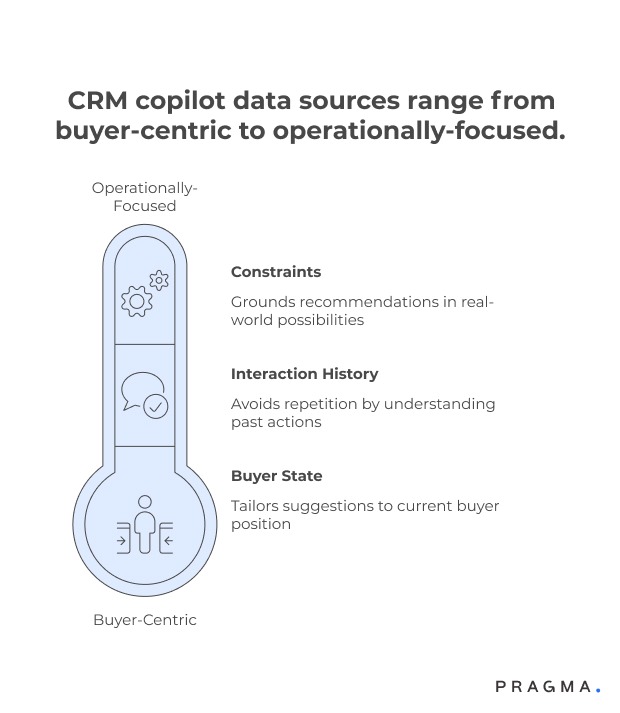
The most valuable input for a CRM copilot is a live view of buyer state — whether the buyer is new or repeat, mid-journey or post-resolution, blocked or progressing. This data allows the copilot to tailor suggestions to where the buyer is now, not where they were last week.
Lifecycle signals such as “payment retry pending,” “delivery exception open,” or “return approved” directly influence what actions are appropriate and which should be suppressed.
Why static profiles are insufficient
Demographics and historical attributes explain who the buyer is, but rarely explain what should happen next. Without state-awareness, copilots default to generic advice that agents already know.
Recent interaction and resolution history
Copilots become materially more helpful when they understand what has already been attempted. Recent messages sent, calls made, refunds issued, or tickets closed provide crucial context for avoiding repetition and escalation loops.
This data helps the copilot answer questions agents constantly face: “Have we already tried this?” and “What was the last meaningful action?”
Preventing redundant effort
Without interaction history, copilots often recommend actions that frustrate buyers because they repeat steps that already failed. Feeding recent resolution attempts sharply reduces this risk.
Operational constraints and eligibility rules
A copilot should know not just what could be done, but what is allowed to be done. Inputs such as refund eligibility, SLA thresholds, inventory availability, or escalation limits keep recommendations grounded in operational reality.
This is where many copilots break down — suggesting ideal outcomes that agents cannot actually execute.
Aligning suggestions with authority levels
When recommendations consistently exceed an agent’s authority, the copilot feels detached from real work. Constraint-aware data keeps guidance realistic and trusted.
Data sources that add noise more often than value
Useful for analysis, harmful for real-time assistance
Long-term behavioural aggregates
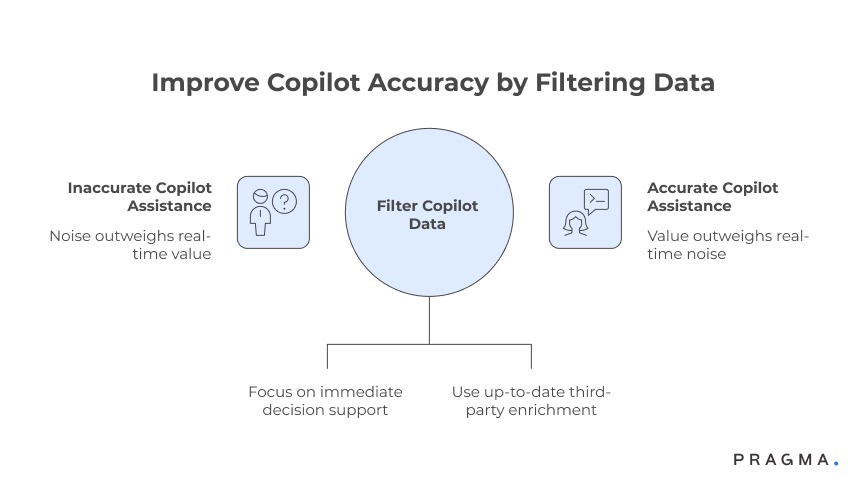
Metrics like lifetime value trends, cohort averages, or historical churn probabilities are powerful for strategy, but weak for moment-to-moment decision support. They rarely change what an agent should do right now.
Including these signals often leads copilots to over-explain instead of guide.
Why strategic data belongs outside the copilot
These datasets are better consumed in dashboards and planning tools. Inside a copilot, they slow response and dilute focus.
Third-party enrichment without freshness guarantees
External data can be valuable, but only when freshness and relevance are assured. Outdated firmographics or inferred intent signals frequently mislead copilots, especially in fast-moving operational contexts.
The risk of confident wrong answers
Copilots trained on stale enrichment often sound certain while being incorrect. This is more damaging than admitting uncertainty and offering a safe default.
Prioritising data sources based on copilot use cases
Different tasks require different intelligence
Mapping copilot responsibilities before mapping data
One of the most common mistakes teams make is deciding what data to feed the copilot before agreeing on what the copilot is actually responsible for. A copilot that supports ticket triage needs very different inputs from one that assists with refunds, retention, or escalation decisions.
Effective teams start by listing the decisions the copilot is allowed to influence, such as prioritisation, suggested responses, next-best actions, or escalation triggers. Only after this is clear does data selection become straightforward.
Why undefined scope leads to bloated inputs
When scope is vague, teams compensate by overfeeding data “just in case.” This produces copilots that sound informed but hesitate, hedge, or over-explain — all signs of unclear authority.
Task-specific data beats universal context
A copilot helping agents resolve delivery issues benefits most from logistics events, SLA timers, and recent carrier scans. Feeding it marketing attribution or lifetime value adds little value in that moment.
By contrast, a copilot supporting retention decisions may need purchase frequency, recent dissatisfaction signals, and suppression rules — but not shipment metadata.
Designing narrow intelligence windows
High-performing copilots operate within narrow, purpose-built data windows. This allows faster inference, clearer suggestions, and more consistent outcomes across agents.
Staging data maturity instead of loading everything upfront
Copilot performance improves incrementally, not instantly
Phase 1 — grounding in reality
The first stage of any copilot rollout should focus exclusively on real-time state, recent actions, and hard constraints. At this stage, the copilot’s job is not to be clever, but to avoid being wrong.
This phase builds trust by ensuring recommendations are always executable, even if they are conservative.
Trust precedes usefulness
Agents forgive simplicity far more easily than they forgive inaccuracy. Early-stage copilots that “never lie” get adopted faster than advanced ones that occasionally hallucinate options.
Phase 2 — introducing prioritisation signals
Once the copilot consistently operates within constraints, prioritisation data can be introduced. This includes urgency indicators, SLA risk flags, or buyer value tiers that influence order of action, not type of action.
At this stage, the copilot begins to save meaningful time by helping agents decide what to do first.
Avoiding premature optimisation
Introducing prioritisation too early often causes copilots to override common sense. Staging prevents this by anchoring behaviour before optimisation.
Phase 3 — controlled enrichment
Only after the copilot performs reliably should enriched or probabilistic data be introduced. Even then, these signals should influence confidence or ranking, not core recommendations.
This keeps the copilot from becoming overconfident based on uncertain inputs.
Keeping uncertainty visible
Mature copilots surface uncertainty instead of hiding it. This is only possible when enrichment is treated as advisory, not authoritative.
A practical data-to-task mapping framework
Ensuring every input earns its place
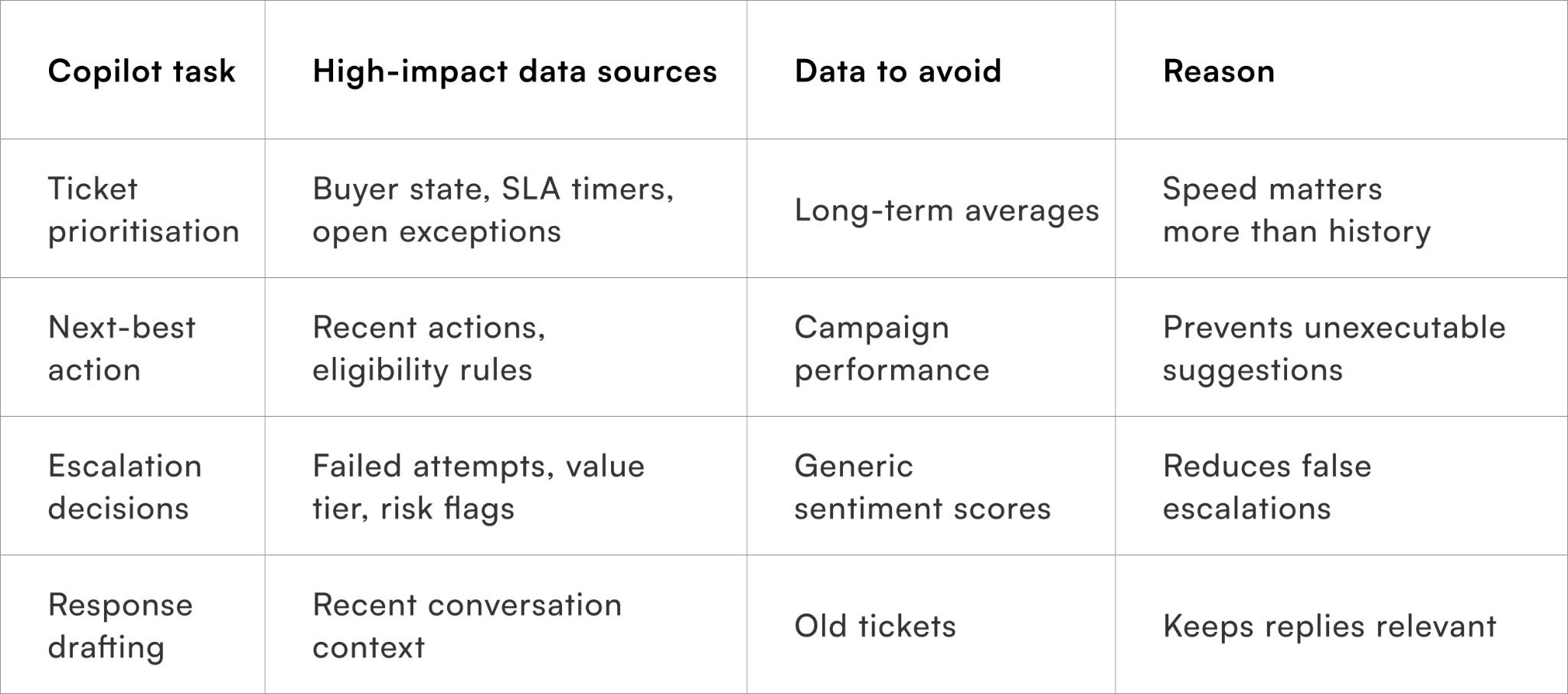
This table helps teams justify each data source instead of defaulting to inclusion.
Guardrails that keep copilots useful over time
Efficiency degrades when data governance is weak
Regular input audits
As systems evolve, new data sources quietly get added. Without audits, copilots gradually accumulate noise and drift away from their original purpose.
Teams should periodically review which inputs actively influence recommendations and remove those that no longer add value.
Subtraction as optimisation
Removing data often improves copilot performance faster than adding new sources. This discipline keeps intelligence sharp.
Feedback loops from agent behaviour
Agent overrides, ignored suggestions, and manual corrections are powerful signals. Feeding this behaviour back into data selection decisions helps identify which inputs mislead the copilot.
Letting agents train the system indirectly
Agents do not need to label data explicitly. Their behaviour already reveals what works and what does not.
Quick wins on training an AI copilot for real CRM efficiency (30 days)
What teams can improve immediately without rebuilding their stack
Week 1: Define what the copilot is allowed to decide
Before touching data, document the exact decisions the copilot is permitted to influence — prioritisation, next-best action, escalation recommendation, or response drafting. Exclude anything that requires human judgement or policy interpretation at this stage.
This constraint is intentional. A narrowly scoped copilot trained on the right decisions outperforms a broadly scoped one trained on everything.
Expected outcome:
Clear boundaries that prevent overtraining and unrealistic expectations.
Week 2: Feed only real-time state and recent actions
Limit inputs to buyer state, open issues, recent attempts, and hard constraints such as eligibility or SLA thresholds. Avoid historical summaries and enrichment during this phase.
This ensures the copilot’s suggestions are always executable, even if conservative.
Expected outcome:
Higher agent trust and fewer ignored or overridden suggestions.
Week 3: Observe agent behaviour, not copilot confidence
Track when agents accept, modify, or ignore recommendations. Patterns here reveal more than accuracy scores. If agents repeatedly override a suggestion, the issue is usually upstream in data relevance.
Use this feedback to remove or tighten inputs rather than adding new ones.
Expected outcome:
Cleaner data inputs aligned with real workflows.
Week 4: Introduce prioritisation signals carefully
Only after consistent correctness is achieved should prioritisation inputs like urgency flags or value tiers be introduced. These should influence order of action, not type of action.
This step is where time savings become visible without risking incorrect guidance.
Expected outcome:
Faster case handling without increased escalation errors.
Metrics that prove CRM efficiency gains
Measure productivity, not perceived intelligence
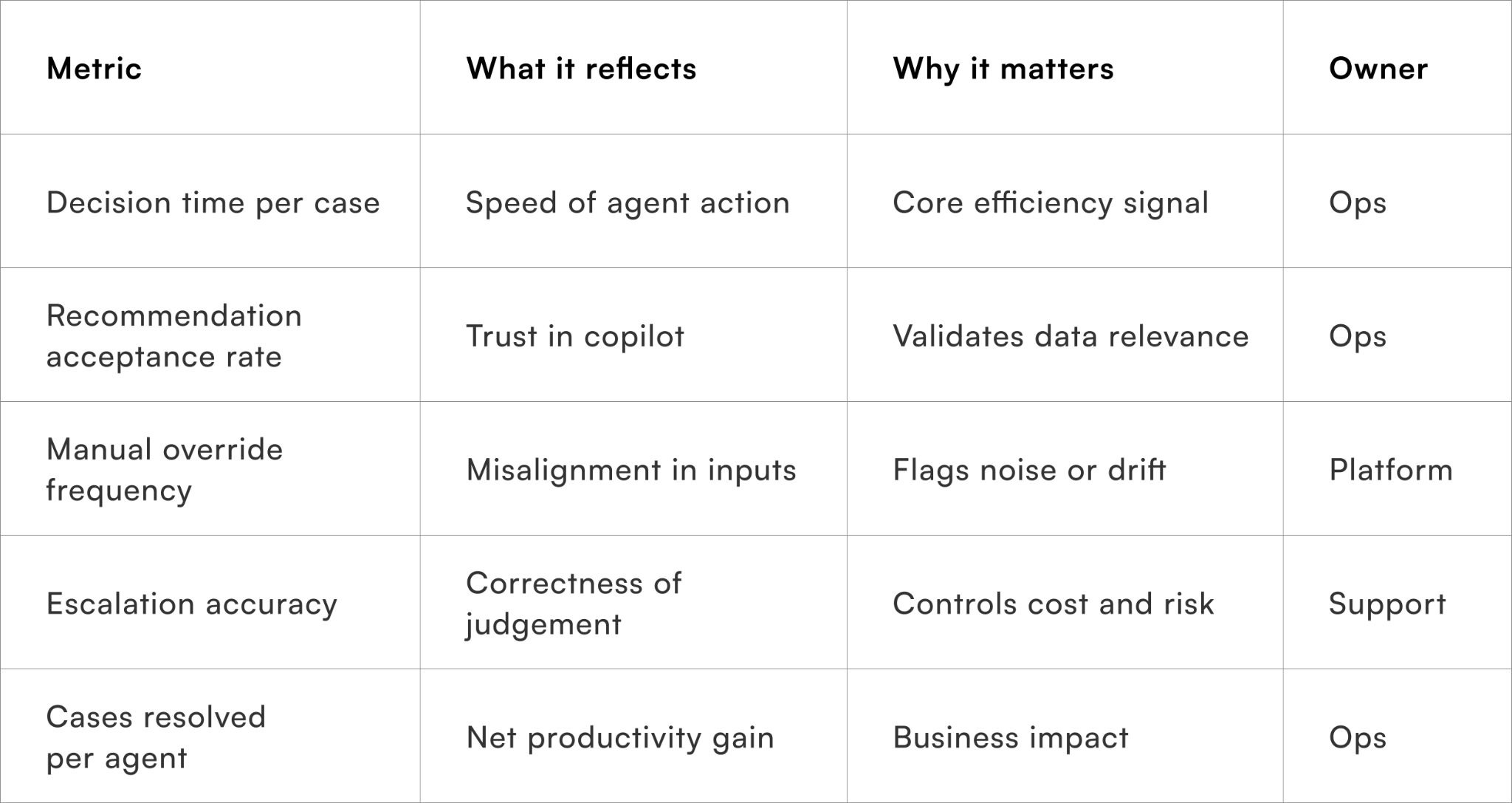
These metrics ensure the copilot is evaluated on outcomes, not how “smart” it sounds.
To wrap it up
Training Your AI Copilot: Data Sources That Actually Improve CRM Efficiency makes one point clear: copilots do not fail because they lack intelligence, but because they are fed signals that do not reflect real operational decisions.
This week, remove one data source from your copilot that agents routinely ignore or override.
Over time, teams that treat data selection as an operational discipline — not an engineering afterthought — build copilots that genuinely reduce effort, speed decisions, and earn trust on the CRM floor.
For D2C brands looking to operationalise AI copilots with disciplined data inputs, Pragma’s orchestration and CRM intelligence platform enables real-time state awareness, constraint-led recommendations, and continuous feedback loops that translate AI into measurable efficiency gains.

FAQs (Frequently Asked Questions On Training Your AI Copilot: Data Sources That Actually Improve CRM Efficiency)
1. What is an AI copilot in CRM systems?
An AI copilot assists teams by automating tasks, generating insights, and improving customer interactions.It enhances productivity and decision-making within CRM workflows.
2. Why is data quality important for training an AI copilot?
High-quality data ensures accurate predictions and relevant recommendations.Poor data leads to unreliable outputs and reduced CRM efficiency.
3. What are the most valuable data sources for CRM AI training?
Key sources include customer interaction history, transaction data, support tickets, and behavioural signals.These datasets provide context for better decision-making.
4. How does customer interaction data improve AI performance?
It helps the AI understand communication patterns and customer preferences.This enables more personalised and effective responses.
5. Can sales data enhance AI copilot recommendations?
Yes, sales data provides insights into buying behaviour and conversion trends.It improves lead scoring and opportunity prioritisation.
6. What role do support tickets play in AI training?
Support tickets highlight common issues and resolution patterns.They help the AI suggest faster and more accurate solutions.
7. How does behavioural data impact CRM efficiency?
Behavioural data reveals customer intent and engagement levels.It enables proactive outreach and targeted campaigns.
8. Is real-time data important for an AI copilot
Real-time data allows the AI to respond to current customer actions and needs.This improves responsiveness and relevance.
9. How can businesses integrate multiple data sources effectively?
By using unified data platforms and ensuring consistent data formats.Integration improves data accessibility and model performance.
10. Can AI copilots continuously improve over time?
Yes, they learn from new data, feedback, and outcomes.Continuous training enhances accuracy and effectiveness.
11. What are common challenges in training CRM AI systems?
Challenges include data silos, inconsistent data quality, and privacy concerns.Addressing these issues is key to successful implementation.
Talk to our experts for a customised solution that can maximise your sales funnel
Book a demo

.webp)
.png)